
B2B – sell to businesses
When businesses buy in your shop, they often have different needs from consumers. Encourage them to buy from you regularly by making it easy – their time is money.
Different customers – different prices
The number of items bought per order is usually the biggest difference between a business customer and a consumer.
To win the order, you may need to offer a different price.
Here are some of the pricing options you can offer your business customers and others:
- Prices that automatically switch to the agreed price when the customer logs in to their account
- Quantity price per product (e.g. a unit price of €15 for 1, €13.50 each for 5 etc.)
- Quantity discount across several products
- Discount based on purchases over time (e.g. the past year)
Reorder quickly – same as last time?
The same 12 products as on a previous order? Of course – and you shouldn't have to waste time finding every single product again.
Making it quick and easy to place the order can be crucial for repeat sales and for building loyalty among your large customers.
Customer accounts give an overview and help you recognise your customers
All your customers – consumers, businesses or public bodies – can save your time and their own with a customer account.
Among other things, they can use it to:
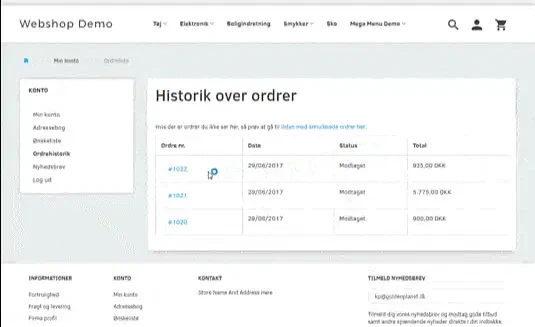
- See previous orders
- Save wish lists/favourites
- Reorder a previous order
- Buy from the wish list/favourites
- Use an address book (easy reordering to one or more addresses)
- Save the basket (build up an order over time)
The toolbox for B2B in your online shop
-
Log in to buy
When only approved customers should be able to buy in your shop.
-
Prices per customer group
Large customers, resellers, VIPs etc. You can set a price for each group and assign selected customers to it.
-
Prices excl. VAT
For customers who reclaim VAT, the price excluding VAT is what matters most.
-
Exclude sales to consumers
You can exclude sales to consumers on all products or selected ones.
-
EAN invoicing for Danish public authorities
Electronic invoicing to Danish public authorities: a requirement for selling to municipalities and other public bodies in Denmark.
-
Approve customers to pay by invoice
You can approve selected customers to complete an order without paying by Dankort or credit card.
-
Quick order page
Add several variants of a product to the basket quickly and easily from one page.
-
Quantity discount
A discount for buying more than 1 item, whether of the same product or across different products.
-
Order history
An overview and the details of previous orders.
-
Reorder
Reorder the whole previous order in one click. Quantities and the final order can be adjusted before it's placed.
-
Save the basket
Build up an order over time without suddenly having to start again.
-
Basket link
Put together an order for your customer and send the contents of the basket by email.
-
Log in as a customer
Help your customers by going straight into their customer account, just as they see it.
-
Customer account
An overview of orders, wish lists and addresses, with ways to save time.
-
Plus many more
These are just some of the tools in the box. Have a feature in mind that we haven't mentioned? Contact us and ask – it may well be one we left out here.

Free demo – the first step to success with your online shop
No strings attached. Nothing to install on your computer. Ready in 5 minutes.