Personal data
EU General Data Protection Regulation (GDPR)
The EU General Data Protection Regulation (GDPR) began to apply on 25 May 2018. In short, it is about creating security and confidence in how data is handled.
You can read more about the GDPR in many places – here is a selection:
- Datatilsynet (the Danish Data Protection Agency), rules and guidance (in Danish) (opens in a new tab)
- Europa.eu, introduction to the GDPR (opens in a new tab)
- Dansk Erhverv (the Danish Chamber of Commerce): GDPR – what about my marketing consents? (in Danish) (opens in a new tab)
- Facebook group about the GDPR (in Danish) (opens in a new tab)
- Erhvervsstyrelsen (the Danish Business Authority), new business models (in Danish) (opens in a new tab)
In connection with the GDPR, we have taken these measures:
- Data processing agreement
- Newsletter sign-up: double opt-in and detailed information about the sign-up
- Account creation: text below the button
Data processing agreement
Under the GDPR, you must have a data processing agreement with the suppliers that process data for your business.
We process customer data etc. for you as part of your solution, and we must therefore have such an agreement.
You can download a PDF of the agreement in Danish here and in English here. The agreement is accepted when you log in to the admin of your online shop.
Newsletter sign-up
To help you document where a sign-up to your newsletter took place and where it came from, we have made these changes:
- When someone signs up to the newsletter, they receive an email with a link that must be clicked before the sign-up is final, a so-called double opt-in. This helps to ensure that it is the owner of the email address who signed up.
- On sign-up, we record whether the sign-up took place in connection with an order (at checkout), via a form or via an integration.
- On sign-up, we record the IP address from which the sign-up was made.
All this so that you can document the consent and ensure that only wanted sign-ups take place.
Account creation: text below the button
When a customer account is created in connection with an order, the customer must, as you know, accept your terms.
This has not been the case when an account is created via the function intended solely for this (the /user/login page).
That is why there is a text just below the button that completes the account creation. It states that by creating an account, customers accept the terms and can read the privacy policy.
It is important that you visit the account creation page in your shop (usually via the ‘My account’ link) and check that the links to the terms and the privacy policy work. If they do not, just contact us and we will help you sort out that detail.
Your privacy policy
You should update or add a section to your terms and/or your privacy policy. Check that your text meets the current information requirements (Article 13 of the GDPR) and fits your shop – for example your payment and shipping partners, newsletter and cookies.
You can customise your terms and privacy policy in your online shop's admin via the menu item ‘Content and layout’ and then ‘Information pages’.
Anonymising customer data
Under the GDPR, your customers have the right to be forgotten. In practice, this means removing their name etc. so that the data can no longer be linked to them.
Note that under the Danish Bookkeeping Act (bogføringsloven, section 12) you must keep accounting records – for example invoices and the order details that form part of the accounts – for 5 years from the end of the financial year to which the records relate. You must therefore make sure not to anonymise data earlier than this if it means that you no longer comply with the Bookkeeping Act.
Customer data is anonymised by replacing the name etc. with a text such as “Anonymised 18-04-2019”, where the last part is the date of the anonymisation. In this way, the customer is “forgotten”, while sales statistics and similar data are preserved.
Once a customer account has been anonymised, the customer will of course no longer be able to log in and see their order history.
Automatic anonymisation
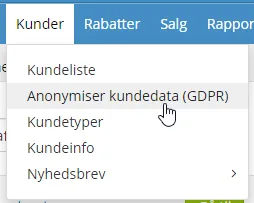
Data can be anonymised automatically when there has been no order activity for a customer for a number of years that you specify.
You will find this option in the admin under the menu item ‘Customers’:
Individual anonymisation
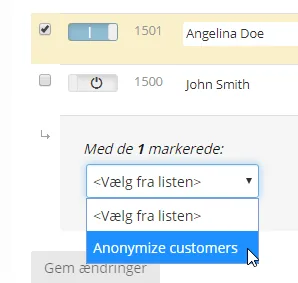
You can anonymise a selected customer by selecting the customer in the customer list, then choosing anonymisation at the bottom and finally clicking the ‘Save changes’ button: