In this category Discounts and discount types
Loyalty discount
If you want customers to come back, a loyalty discount is one option. For example, give 10% off future purchases once a customer has spent more than €150 – yet another reason to come back and shop in your shop in particular.
Rewarding customer loyalty can help build an even stronger bond between the customer and your shop, while discounts are only given to customers who already shop with you.
Present a small discount, e.g. 5% when spending more than €150, as an extra offer, and then delight customers by increasing the discount as they move up the loyalty ladder. This makes customers spend larger amounts in the shop sooner, to reach a higher discount percentage.
Creating a loyalty discount
To create a loyalty discount, go to Discounts > Loyalty discount conditions in the admin.
In here, click Add new loyalty discount rule.
General:
Here you enter the title and, if needed, start/end dates.
Who can use this option?
If only certain customer types or customer groups should be allowed to use this loyalty discount, or if it should only apply to certain delivery methods or shipping zones, you also set that here.
You can also exclude, for example, products on sale, or limit the loyalty discount entirely to selected products or product categories.
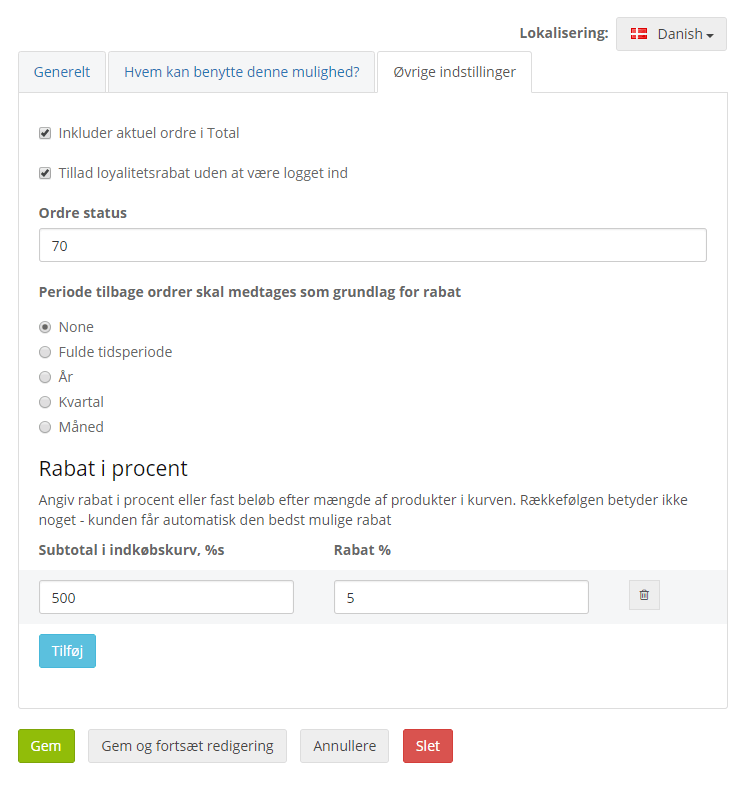
Other settings:
Include current order in total – Should the order the customer is placing in the shop right now count towards the loyalty discount?
Allow loyalty discount without being logged in – Should the customer get the loyalty discount without being logged in to their account, if they have one? This gives a new customer who shops in the shop, and puts the amount concerned in the basket, the chance to get the loyalty discount.
Order status – The minimum status the order must have to be counted. Here you enter the sort order number of the order status.
If, for example, it should be when the order has been dispatched, find the sort order number for that status under Sales > Order status setup.
Period of past orders to include as the basis for the discount – How far back should the amount be added up? Should the customer have spent the amount within a year, a quarter or a month – or over the whole time they have been a customer of the shop?
Discount in per cent – Which discount should the customer get, at which target.
Should it be 5% when spending more than €150 – and then 10% when spending more than €400? Then first create one rule and click Done, then click Add and the second rule can be created. Remember to click Done.
Example: if the customer should get a 5% loyalty discount once €70 has been put in the basket.