
In this category Optimising for search engines and AI chatbots
Optimising for search engines and AI chatbots
Set up llms.txt for your online shop
On this page
An llms.txt file is a text file placed in the root of your website (e.g. yourshop.com/llms.txt). The file helps AI services such as ChatGPT, Gemini, Copilot and others understand your online shop – what you sell, who you are and what makes you unique. Think of it as a robots.txt, but for artificial intelligence instead of search engines.
Where to find the function in the admin
You will find the function under the SEO menu item in your admin.
- Go to SEO in the top menu
- Choose Robots.txt & llms.txt
- You now see two text fields – one for robots.txt (at the top) and one for llms.txt (at the bottom)
- Enter your llms.txt content in the bottom field and click Save
Your llms.txt file is now available at yourshop.com/llms.txt
See the result (straight after a change)
When you have changed your llms.txt setup, there is some delay before it is published to the cache on the front end.
To see the result sooner, go to
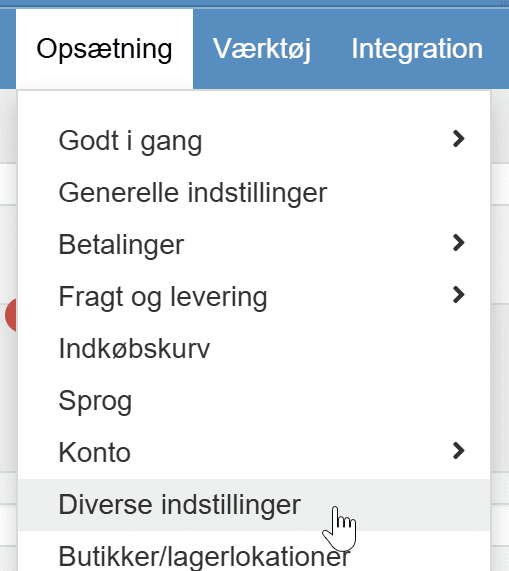
and then click

Why does llms.txt matter?
More and more consumers use AI services to find products and recommendations. When a user asks an AI something like “where can I buy organic dog food in Denmark?”, the AI can use your llms.txt to understand your online shop and recommend you.
Without an llms.txt, the AI has to guess from your website’s HTML, and important details can get lost.
With an llms.txt, you give the AI a clear, structured description of your business – and increase your chances of being recommended.
How to build a good llms.txt
A good llms.txt for an online shop should contain the following:
- Company name and short description – Who are you, and what do you sell?
- Main product categories – What are your main categories?
- Unique selling points (USPs) – Free delivery, fast delivery, made in Denmark etc.
- Target group – Who are your customers?
- Important pages – Links to contact, terms and conditions, popular categories
- Language and area – Which country and language do you trade in?
Example of a simple llms.txt:
# NordicHome.com
> Danish online shop with Scandinavian home furnishings and furniture
## About us
NordicHome is a Danish online shop selling Scandinavian design
at competitive prices. We offer free delivery over €70
and a 30-day return policy.
## Product categories
- Furniture (sofas, dining tables, bookcases)
- Lighting (lamps, candle holders)
- Textiles (cushions, throws, curtains)
- Decoration (vases, pictures, mirrors)
## Unique benefits
- Free delivery over €70
- 30-day return policy
- Danish customer service
- Fast delivery (1-3 working days)
## Important pages
- Contact: nordichome.com/contact
- Terms and conditions: nordichome.com/terms
- New products: nordichome.com/new
Use AI to create your llms.txt
You can use an AI service such as ChatGPT, Gemini or Claude to generate your llms.txt. Here is an easy way to do it:
Step 1: Open your favourite AI service (e.g. chatgpt.com (opens in a new tab) or gemini.google.com (opens in a new tab))
Step 2: Copy this prompt and adapt it with your shop’s URL:
“Create an llms.txt file for my online shop [yourshop.com]. Visit the site and write a structured description with: company name, short description, product categories, unique selling points, target group, language/country and important pages. Use Markdown format with headings (#) and bullet lists.”
Step 3: Review the result and correct any errors or omissions
Step 4: Copy the finished text into the llms.txt field under SEO > Robots.txt & llms.txt in your admin and click Save
Tip: You can always update your llms.txt as your shop develops – for example, when you add new product categories or change your delivery terms.
Tips for an even better llms.txt
- Keep it up to date – Update your llms.txt when you change your range, prices or terms
- Be specific – Write “Danish online shop with over 2,000 organic products” instead of “We sell lots of products”
- Put the most important things first – AIs typically give the most weight to the content at the start of the file
- Use plain language – Avoid jargon and abbreviations the AI may not know
- Include keywords – Think about which words your customers would use when they ask an AI