In this category SEO school
Hooray, you’re number 1 – or are you…?
Google tailors the search results to the person searching. See how to check your online shop’s real ranking on Google – without your personalised results.
On this page

When Google shows a search result, it is almost always tailored to the individual person searching.
So if you see your own website at number 1 for a search, it may be because Google has worked out that you are rather fond of your own site.
Find your ranking for a search right here and now
If you want to see where you rank for a search on Google right here and now, leaving personalised search aside, the easiest way is to use the website startpage.com (opens in a new tab)
When you search on startpage.com (opens in a new tab), it searches via Google without revealing anything about who you are, what you have searched for before and so on. That gives you a “clean” result and a more accurate picture of how well you rank in Google.
It may be a simplified result, though, without images and other content, for example. But it is a quick and easy way to check your ranking.

Follow how your rankings develop
It can be interesting to follow your rankings over time and get an easy overview of how you rank in the search engines for lots of different keywords.
For that you need a good tool.
One of them is the Danish accuranker.com (opens in a new tab)
Get free information from Google Search Console
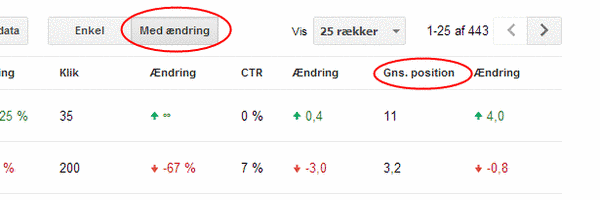
Google Search Console can also give you information about, among other things, your average ranking (they call it position) for the most common searches your pages appear for. And there can often be quite a lot of them.
First, of course, you need to be set up in Google Search Console if you aren’t already. You can see how here in the SEO school.
Once you are in, choose your website and open the Performance report (search results) in the menu on the left. Click Average position so the position is shown together with clicks and impressions, and see the individual searches under Queries.
With the date filter, you can also compare two periods and see whether your pages have gone up or down for the individual searches.