
In this category SEO school
The same and the same and the same and…
Duplicate content can cost you rankings on Google. Get to know the two types, and see how to avoid them in your online shop.
On this page

Who wants to listen to repetition? Not many people – and search engines certainly don’t.
So if your online shop has content that appears in more than one place, it can harm your rankings in the search engines. When Google sees content it has already seen somewhere else, it tries to work out who is the original or most likely source of the text. The other copies are pushed further down the search results.
There are 2 types of duplicate content:
-
The same content within the same website
For example, the same products in several categories
-
The same content on several different websites
For example, content that has been stolen, or content that suppliers give to several retailers
Find duplicate content with a Google search
A quick and easy way to find out whether you have content that appears in several places (on your own website or elsewhere) is to search for it on Google.
In most browsers you can do this by selecting some text with the mouse, right-clicking and choosing an option called something like Search Google for “…”.
Here is an example from the Chrome browser:
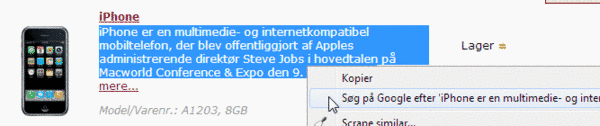
Google then shows the pages it thinks have content that is identical or similar to what you selected.
This method does, of course, depend on Google knowing the pages that may have the duplicate content. So you can’t necessarily use it for pages you have recently created or changed in your own shop, for example.
Find duplicate content with Moz
If you want all your pages checked for duplicate content, you can use the online tool Moz Pro (opens in a new tab).
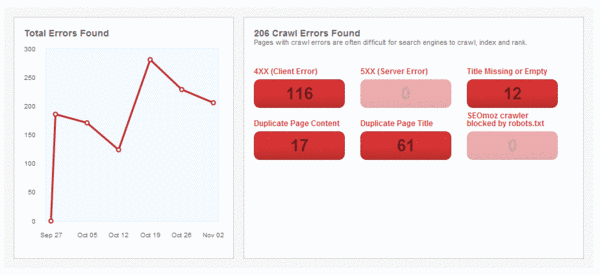
Once it has read through all your pages, it comes up with a list of the pages you should check. Moz doesn’t take into account products that are correctly set up in several categories or excluded from Google, though, so the list from Moz can only serve as inspiration for finding pages you have not yet set up correctly.
Here is the overview in Moz, from which you can get a list of the individual pages:
How to avoid duplicate content
The most important way to avoid duplicate content is, of course, to write your own texts, or to make sure that content supplied from outside (e.g. by a supplier, manufacturer or copywriter) has been given only to you.
If you have a product you want to show in several product categories – e.g. a shoe that should appear in both the “Men’s shoes” and the “Offers” category – you can easily tell the search engines to use only one of the pages.
You do this in your shop by marking which category is the primary one on the Product categories tab:
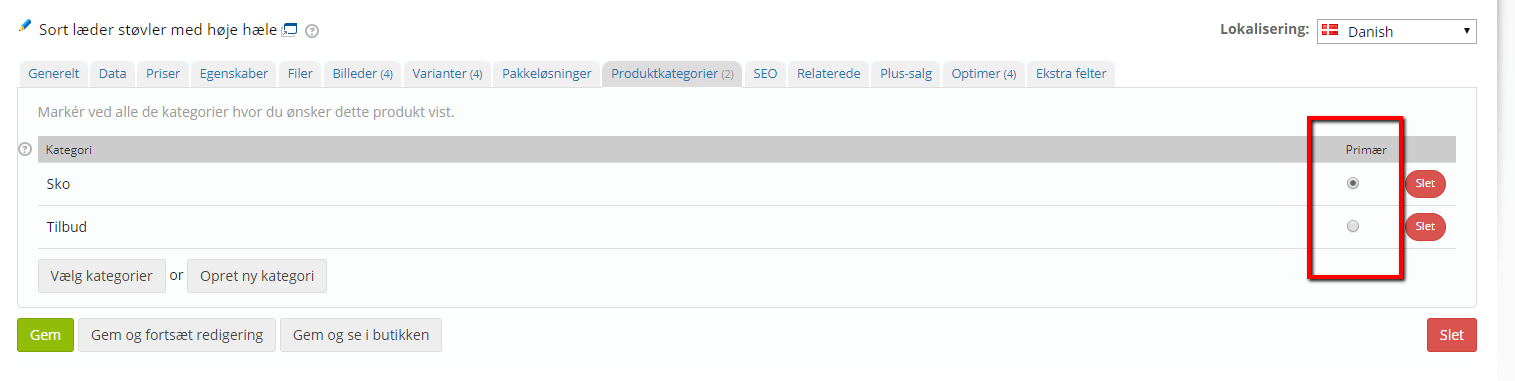
This sets what is known as a canonical tag when the products are shown from the extra categories.
Another challenge can be products that are almost identical, where it is either hard to give them all unique content or you don’t have the time right now to write unique content for each one.
You can solve this in your shop by asking the search engines to ignore all the products except one, and perhaps adding related products on the one that is shown. Better to have one product shown at the top of Google than several pages far down.
You can ask search engines to ignore a product or product category on the SEO tab:

STOP THIEF – stealing your content
If a competitor or anyone else has taken the easy way out and lifted some content from your site, it can harm your search engine optimisation. Especially if that website is generally strong in the search engines.
If it is a blog or a media outlet you would actually like to be mentioned on, you could consider letting them use your content, as long as it is a small extract and they link to your site.
If, on the other hand, it is a competitor or somewhere else you don’t want a copy of your content, there are several things you can do:
- Get in touch by email or phone and ask them to remove the copied content immediately
- Hand the case over to your lawyer
- Use a tool such as dmca.com to pursue a case
- Report it to Google using Google’s form for removing content for legal reasons (opens in a new tab) (e.g. copyright infringement)