In this category Email service
I can’t delete mail in webmail
If you mainly use webmail to handle your mail (i.e. you don’t download your mail to a local PC), you may find that the available disk space is nearly used up, so you need to delete old mail that is no longer relevant to free up more space.
When you do, you may see an error like this:
ERROR: Could not complete request.
Query: COPY 5,17:24,55:56,58:61 “INBOX/Papirkurv”
Reason Given: Over quota
The problem is that Roundcube doesn’t move the mail to the trash; it copies it and then deletes it from its original location. Logically enough, this can’t be done if the mailbox has already run out of space, as the copy can’t then be made.
Solution:
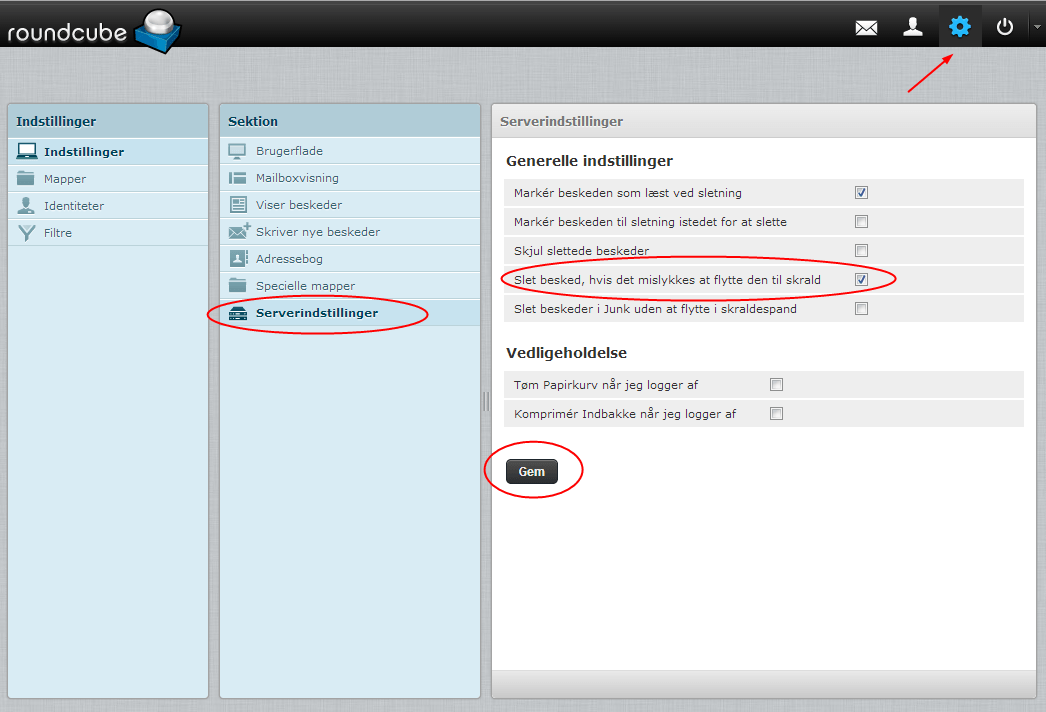
- Log in to webmail
- Go to Settings (the cog icon at the top right)
- Choose Server Settings
- Tick If moving messages to Trash fails, delete them