
In this category Design & layout
Get started quickly with a design template
On this page
If you want to get started building your online shop quickly and easily, the first thing to look at is starting with a template.
Even if you start with a design based on a template, you can of course always build on it later.
Some of the advantages of a template:
- You get started quickly
- A template can be customised a great deal through its structure and styling
- The “classic” elements are already in place
- The template is ready for mobile, tablet and large screens alike
- Time and money saved in the start-up phase
3 steps to a good start with design templates:
- Choose the template that suits you best as a starting point
- Choose a structure/layout (optional)
- Look at the options for further customisation of colours etc.
1: Choose the template that suits you best as a starting point
See the different design templates, and examples of online shops built on them, on the page about design.
2: Choose a structure/layout (optional)
Once you have chosen a template, there may be some things that aren’t quite where you want them.
Choosing a structure means deciding where each element should go. For example:
- Placing the logo in the middle
- Product categories running down the middle
- Search box together with the menu at the top
- No filters in product categories
- and so on.
If none of the standard structures suits you completely, do this:
- Choose the structure that is closest to what you want
- Make a sketch as described here of the things you want changed
- Send the sketch to us and we’ll make a free proposal
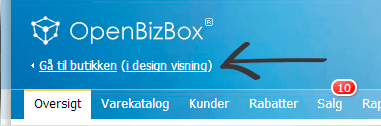
You’ll find the option to customise the structure by clicking In design view at the top left of your shop’s admin
You can then choose the structures like this (hover your mouse over each number if you’re not on mobile):
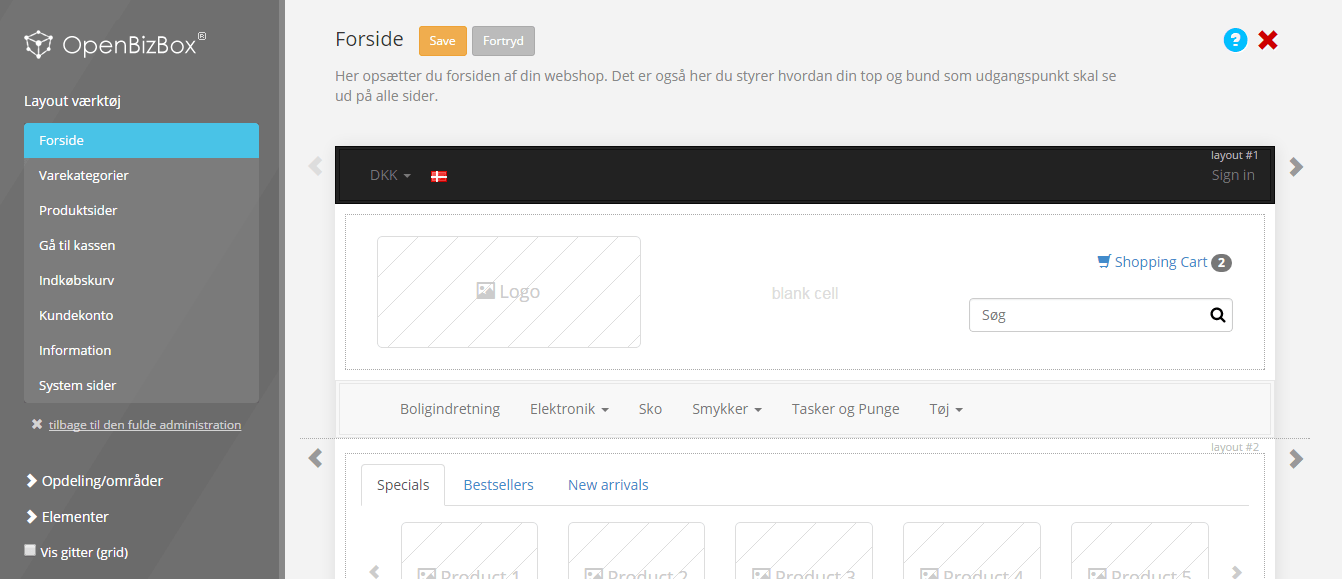
- Click the page type you want to choose a structure for
- Click the arrows next to each section to see ready-made structures you can choose
- Click Save and your new structure is saved. Go to your online shop (without /admin in the web address) and see your new structure.
3: Look at the options for further customisation of colours etc.
After choosing a template and a structure, there may be things you want to be different in your design.
A good place to start is customising colours, which you can read more about here.