
In this category Payments
Payment by bank transfer
You can create a bank account payment method, so your customers can transfer the payment directly to your bank account.
Getting paid into your own bank account does not need a payment gateway.
Setting up your shop
Go to Settings > Payments > Payment methods and choose Add new. Then choose Payment to your bank account and Create.
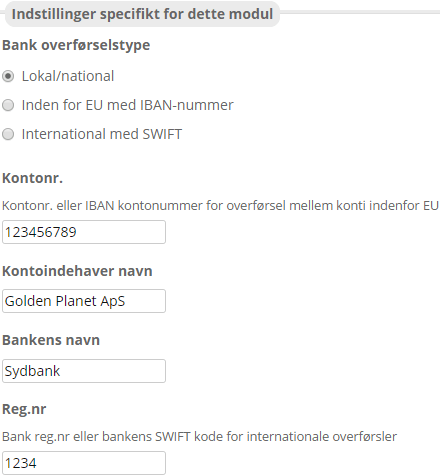
In the payment module you control the settings.
Under Bank transfer type, enter which kind of bank the transfer goes to: a Danish bank, a bank within the EU that requires an IBAN, or an international bank with a SWIFT code.
Remember to fill in as many fields as possible, to make sure the payment reaches the right person/bank. It’s also a good idea to double-check the numbers.
Note: The customer has to make the payment themselves through their own bank or online banking – it does not happen automatically.
When you are happy with it, click Save, and the payment method has been created.