
In this category Payments
Pay by invoice
You can offer payment by invoice in your online shop. With this solution you can send your customers an invoice, which they then pay.
A payment solution with an invoice does not need a payment gateway.
Setting up your shop
Go to Settings > Payments > Payment methods and choose Add new. Then choose the Payment by invoice module and Create.
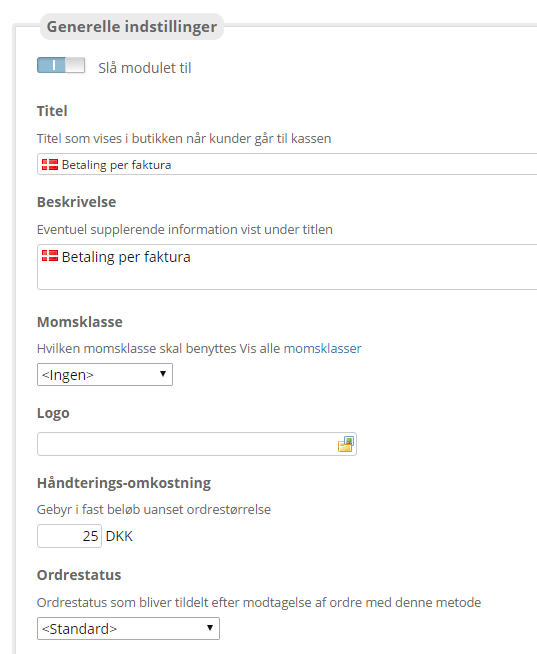
In the payment module you control the settings.
• Enable/disable module lets you switch the module off temporarily without losing your settings
• Title/Description can be adjusted as needed or used as they are
• Logo By clicking the icon, you can use your own logo for payment by invoice
• Handling cost – here you can enter an amount if using payment by invoice should cost customers a fixed amount
• Order status that is given to orders received with this method
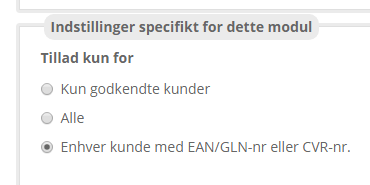
Settings specific to this module:
• Allow only for – here you set which customers should be able to see this module. The option Approved customers requires you to go into each customer (who has ALREADY been created and has an account with you) via Customers > Customer list and tick the box Allow payment by invoice.
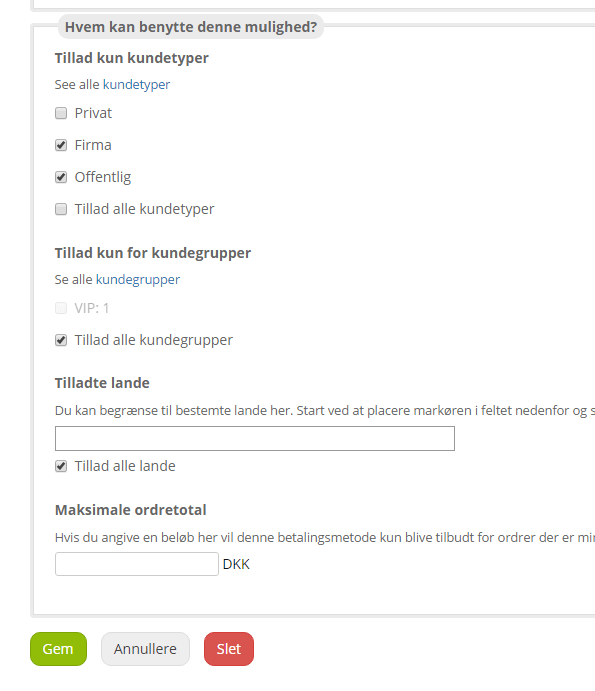
• Allow only customer types – if only a particular customer type should be allowed to use this payment method, set it here
• Allow only for customer groups – if only a particular customer group should be allowed to use this payment method, set it here
• Allowed countries – if the payment method should only be allowed for particular countries, you can set the restriction here.
• Maximum order total is used if this payment method should only be available for orders below the amount you enter
Finally, save your entries at the bottom.
You are now ready to receive payment by invoice.