
In this category Integrations
Forms – create your own contact forms and more
On this page
Wufoo.com
If you would like a contact form, a survey form or another kind of form on your site, you can use wufoo.com.

At wufoo.com you decide for yourself what the form should look like, how many fields it should have and what they should be called and contain, so it can be used for many different purposes.
There are several different price plans – see the current plans at wufoo.com.
Insert the form on a page in your shop
-
Create an account at wufoo.com (opens in a new tab) and verify your email
-
Create a form in their editor
-
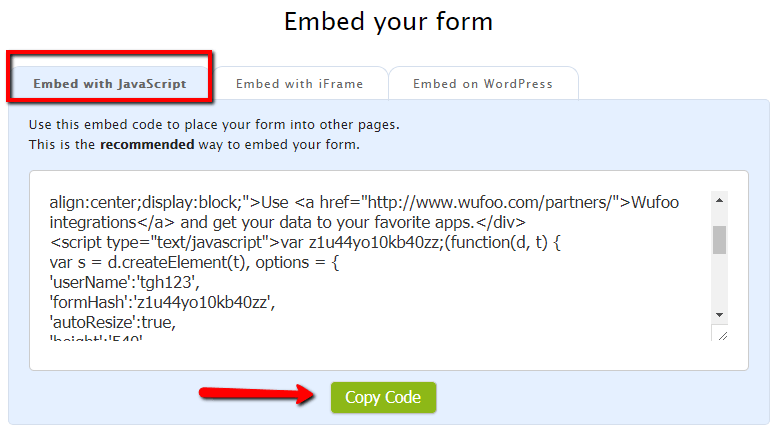
Choose “Embed with Javascript” and copy the code
-
Create or edit the page where you want the form (information page, product, category, tab etc.).
-
In the content (typically “Description”), click <> (source code) on the far right of the editing toolbar
-
Paste the code from Wufoo into the box that appears and then click OK
-
Save your new page – and you have a page with a form your customers can use

Form as a link
-
Create an account at wufoo.com (opens in a new tab) and verify your email
-
Create a form in their editor
-
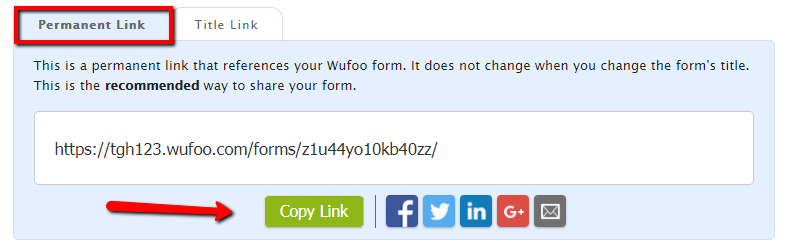
Choose “Permanent link” and copy the code
-
You can now, e.g., share the link in an email or on social media
Jotform
You can of course do the same with other services like Wufoo – one of these, which many people also use, is Jotform.com (opens in a new tab)