
In this category Shipping & delivery
Delivery to DAO parcel shops (DAO365)
On this page

DAO, a Danish parcel carrier, often has good shipping prices – especially for smaller parcels. Feel free to compare current prices and delivery times with GLS and PostNord, for example via shipmondo.com (opens in a new tab).
If you want to use DAO to deliver directly to an address (private or business), you can simply use one of the general modules with a flat rate or by weight/price. Then create a DAO shipping label via shipmondo.com (opens in a new tab), for example.
DAO also offers delivery for collection from a parcel shop, and there it’s of course best if the customer can choose which parcel shop.
Note: DAO has a maximum parcel size/weight it can handle. Remember to check that your parcels are within the limits DAO (opens in a new tab) has set.
For this, we have developed a module that gives your customers a list and a map based on a postcode, to make the choice easy.
Here we show you how to set it up in your online shop.
Add and set up the module
You’ll find the delivery methods under Settings > Shipping and delivery > Delivery methods – and there you choose Add new.
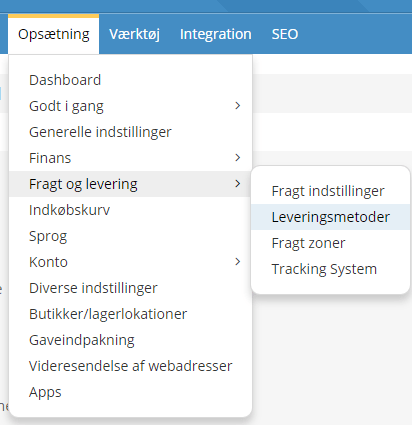
Next, choose which module to install. Choose the one called DAO parcel shop.
General:
First enable the module, and choose whether it should be used as a shipping estimate in the basket. That way customers can see what shipping will cost them when they add products to the basket.
Remember to set the VAT class – shipping has to be invoiced with VAT.
You can also enter handling costs and a maximum order weight.
If your products don’t have a weight and you don’t have time in your diary to add it, there may be one weight that suits most of your orders.
That’s why you can enter a default weight for a single parcel in Default order weight, kg. It is then used when not all the products have a weight.
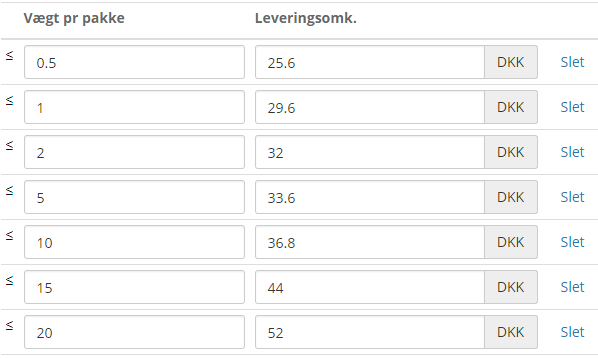
Here you enter your shipping prices (excl. VAT). See the example below.
Who can use this option?
On this tab you set who is allowed to use this delivery method.
Should it be all customer groups and all customer types?
API:
If you have an agreement for delivery directly with DAO, you can enter your API keys from DAO here (you need to send a lot of parcels a year to get a direct agreement with DAO).
If you send via shipmondo.com or another service, you can simply leave the API fields empty.
This is also where you choose how many parcel shops are shown to the customer. We recommend a maximum of 10.
Remember to save when you’ve made your settings.
Order processing
On the orders you can see which ones were placed with DAO parcel shop delivery, and also which parcel shop number was chosen.
From these orders, the recipient’s name, the parcel shop number and other details have to be copied manually to shipmondo.com, for example – or contact them to ask about an integration, so the details are transferred automatically.