
In this category Product catalogue
Hand the boring work to the robots
On this page
Fetch product information automatically from another website. And have it translated at the same time, if you like.
You can now do this on your e-commerce platform here at Golden Planet.
If, for example, you have a German supplier with presentations of products you sell, you can now create them in your own language in your online shop simply by copying the web address – and the robots take care of all the boring work.
You can also use it to move your products from another platform (see the section at the bottom of this page).
Hundreds or thousands of products can be created in much less time – and you can spend that time on something much more fun and clever.
 Play video: Robots create your products (opens Vimeo)
It's this easy
1: Go to “Categories and products”
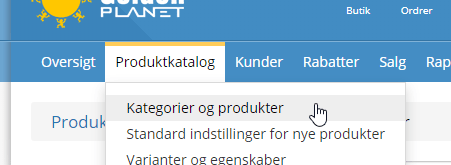
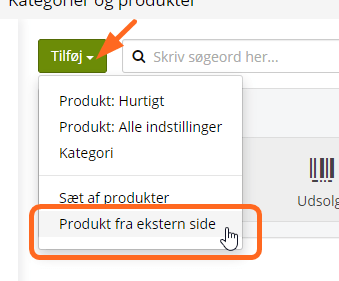
2: Click the down arrow next to “Add” and choose “Product from external page”
3: Paste in the web address(es) of the products you want in your online shop
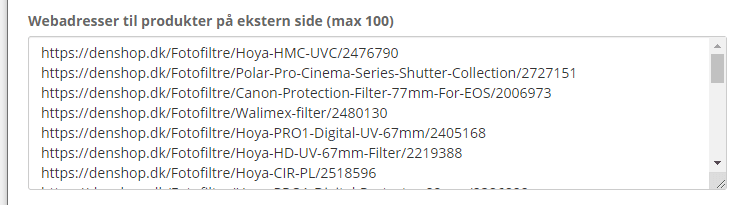
You can copy many web addresses at once with a plugin for the Chrome browser – search for “copy all urls” in the Chrome Web Store, for example. See how in this video (opens in a new tab).
4: Add translation if you like
If you have several languages active in your online shop, you can have the products translated into all those languages at the same time.
You can also use it the other way round, if the page you fetch the product from is in a different language from the one you use in your online shop. For example from German to Danish, like this:
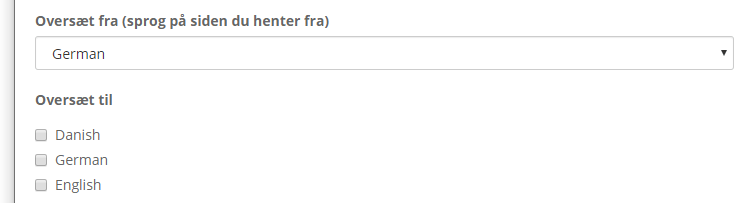
The translation is done by machine. It is often of very high quality and comes as a finished text that you are free to change into your own final text. Right now it costs just 1 robot coin per translation/language.
5: Set the robots to work!

6: Follow the status and adjust the product
You can follow how the fetching of the product data is going by going to the All products list
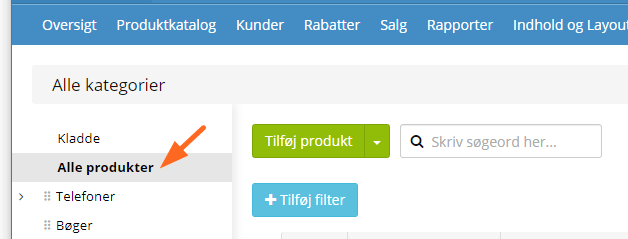
and then choosing the view From external page (in progress or fetched) at the top right.
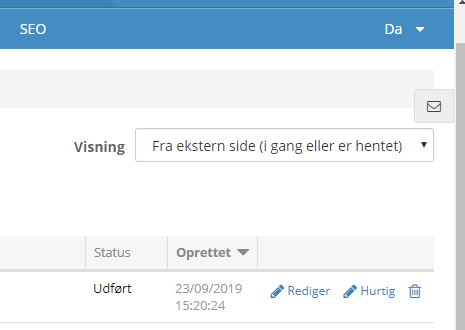
When a product has the status Done, the robots have finished and you can edit the product to put it on the shelf in your online shop (by giving it a product category) and make any further changes so the product looks the way you want it in your shop. Perhaps the price needs adjusting too.
If data is missing
If any of this data is on a page you gave to the robots, but is missing:
- Primary product image
- Extra product images
- Price
- Brand
- Product number
- Barcode (EAN/GTIN)
- Short description
- Long description
then it is because the robots need help to learn where that data sits on the pages.
Just tell us about the page, and we will help the robots get started. We do the first page free of charge – after that it costs a little. Almost all online shops/websites use the same layout for all their products, so a single setup is enough.
You can order a setup with the button here:
Find more data (opens in a new tab)

Is it worth the money? I could just do it myself
Whether it is worth the money depends on what you value your own (or an employee's) hourly rate at.
If you are among the fastest, you can probably create about 20 products by hand in an hour.
That would cost about €1.50 with the robots. In other words, you have saved €1.50 in an hour by doing it yourself. So the question is whether you could do something worth more than €1.50 in that hour instead.
When you have used your first 300 free robot coins, you can buy more from the page where you add web addresses, or with the button here:
Get more robot coins (opens in a new tab)
All products from a site
If you have a supplier and want all their products fetched, we can offer to do a so-called “crawl” of the whole site.
It can also be used if you have an online shop on another platform that you want to move here to the Golden Planet e-commerce platform.
There are 2 obvious ways to get a list of all the products:
1: From a product feed

Most shops have a product feed that is used to show products on Facebook and Google Shopping, for example.
With the web address of that product feed, a list with the web address of every product can be made quite easily.
You can save the list to a file and open it in Microsoft Excel. Or order the list from us via this page (opens in a new tab).
2: By crawling the site from start to finish

If you can't get a product feed, you can “play Google” and go through the whole website from link to link – also known as crawling the site.
You can order such a crawl from us via this page (opens in a new tab)
Use it to move from another platform
The robots can also help you move from another platform. For a move you get:
- Redirects (301 redirects) created automatically from the old to the new web address
- The menu structure/categories brought over
- All the product information described above
When you set the robots to work, you simply tick categories and redirects. When your domain name is moved to your new platform here, all products will be ready to redirect from the old web addresses – that is good for your SEO and good service for your customers.
Start by trying with a single product. If categories or some product data are missing, that needs setting up first – you can order that here: