
In this category Product catalogue
Product catalogueProducts
Meta data – when you need an extra field

This is a bit “technical”. But it is also something that opens up lots of new possibilities.
In short, you can now decide on extra fields for your products and customers yourself. These are called meta data.
If, for example, you need a customs number on all your products, you can create “Customs tariff code” yourself and enter it on the products when you edit them. It could also be packaging weight, notes for ordering, price group etc.
Meta data is available via the API, so it can also be used in integrations with other systems.
Create and add meta data
Meta data is divided into groups, and under them the title of the field (also called the key). Each field of course holds the data itself.
You can easily use the same name for both the group and the title.
If, for example, you want to store a customs number on your products, you could create a group called “customsdata” and then a title/key called “tariffcode”. Note that only lower-case letters from a to z (without spaces) may be used in these.
The easiest place to do this is on the Meta data tab when editing products:
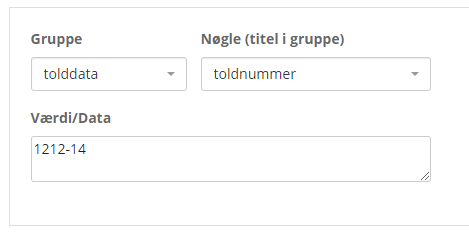
A new group or title/key can be created directly while editing the product, simply by typing it and then pressing Enter (or clicking the name).
The same goes for customers: edit them from the customer list and then go to the Meta data tab.