
In this category Other topics
Currency
On this page
If you would like to let your customers see the shop in a currency other than Danish kroner, you can easily turn it on.
You can even have the exchange rates updated automatically every day, so your prices always follow the rate.
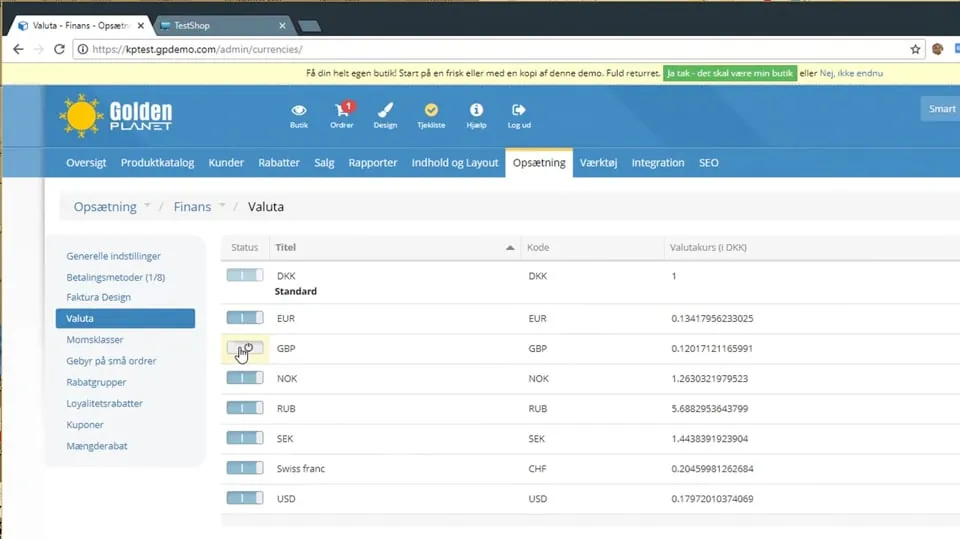
Enable several currencies
You enable several currencies by going to Settings > Payments > Currency.
In there, you choose which currency you want to enable; you can also create a new currency yourself if the one you want is not there already.
By clicking Edit on the right, you can set whether there should be a symbol or a text next to the amount, which separators to use and which exchange rate it should have. If you use a fixed rate, enter it here – and make sure that the automatic update of exchange rates is turned off.
Turn automatic updates on/off
If you want the exchange rate to update automatically, turn it on under Settings > Payments > How prices are shown in the shop
Here you enable Update currency automatically and save your changes.

The exchange rates – and with them the prices – will then be updated automatically every day from an external source.
 Play video: Currency (opens Vimeo)
Rounding prices converted into another currency
When prices are converted into another currency – especially at a daily rate that changes – almost all of them end up as “odd” amounts. A price of DKK 120 could become €16.09 – but €16.00 or perhaps €16.25 would look nicer.
This guide shows how to set up rounding of prices per currency