
In this category Release notes
Version 6.16
On this page
Here are the most important new things you get in this update:
- Product sets (several products sold together – and only together)
- Optimisation of new images
- Automatic update of exchange rates
- Update of the Post Danmark integration
Product sets – buy several products together
Your online shop already offers product bundles. The difference between a product bundle and a product set is:
- Product bundle: There is one product as the starting point, which can be bought together with other products if the customer wants. The primary product can easily be bought on its own. There can be several combinations of bundles based on the primary product.
- Product set: A ready-made combination of several products. On the page where the product set is shown, the only option is to buy this combination of products at one total price.
With a product set you make it easy for the customer to buy a ready-made set of products. You can present and market them as this ready-made set.
When a product set is added to the basket, the set is shown as one presentation, with a line for each of the products in the set as well. Each product is included in the order so that you can still manage stock for the individual products, because they are often also sold individually or are part of several different sets.
Here is an example of how a product set is presented:
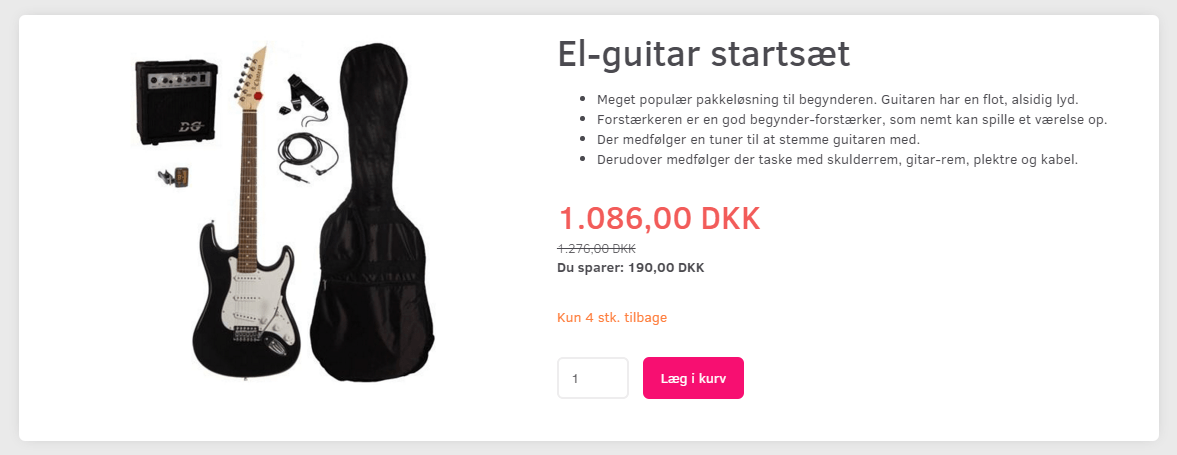
See here how to create a product set in your online shop
Optimisation of new images
If you have product images in a very large format, you no longer need to optimise the image before adding it to products to save disk space etc.
From version 6.16, the image is optimised automatically as you add it to the product. The original image is deleted afterwards so that it doesn’t use up your disk space.
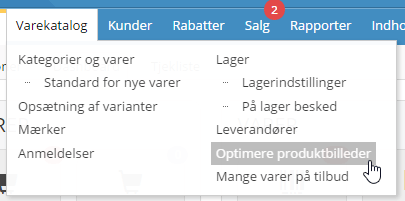
You can change the resolution/size and quality the images are optimised to in your online shop’s admin, under Product catalogue > Optimise product images:
Automatic update of exchange rates
When there are big fluctuations in a currency, you may make a loss, or a price may no longer be competitive, if the exchange rate isn’t updated.
You can now have your exchange rates updated automatically once a day.
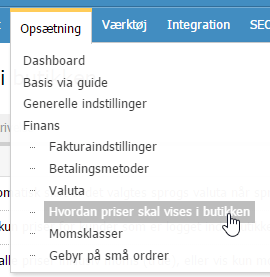
You activate it via Settings > Payments > How prices are shown in the shop
Update of the Post Danmark integration
With Post Danmark’s move to PostNord’s systems, you need to replace your API key to be able to handle orders with the Pacsoft integration.