
In this category Release notes
Version 6.36
On this page
First and foremost, this update brings four new options that we have been developing for a long time:
- Filtering products, customers etc. independently of the columns shown
- See sales per product in a chosen period
- Payment with Klarna
- Stock synchronisation between several shops
There is also a smaller update to the order checklist, which lets you see the total in orders per product.
Filtering
On every list, e.g. your product list or order list, it is now possible to filter on all columns.
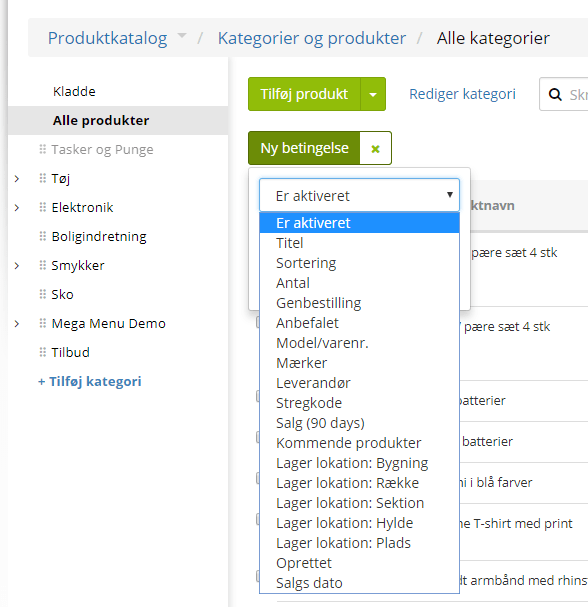
When you click the Add filter button, you can choose between the active columns in a drop-down list.
When you choose a column, you get the option to create a filter.
The filter is adapted to whichever column is chosen.
If, for example, Created is chosen, you can enter a date and choose whether it should be greater/less than, equal to or empty.
If Supplier is chosen, there is a drop-down list of the suppliers you have created to choose from.
When the filter has been chosen, the list shows the items that meet the conditions set.
It is possible to set several filters/conditions, but be aware that all conditions must be met for the items shown.
Sales per product
Via the new filtering option, sales per product in a chosen period can be shown.
This way you can, for example, see which products were sold in a particular month in a particular year.
You do this by going to the product list in the admin and choosing the filter called Sales date.
Here you set a date and choose, e.g., greater than/equal to. You then get a list of all the products sold on that date and since.
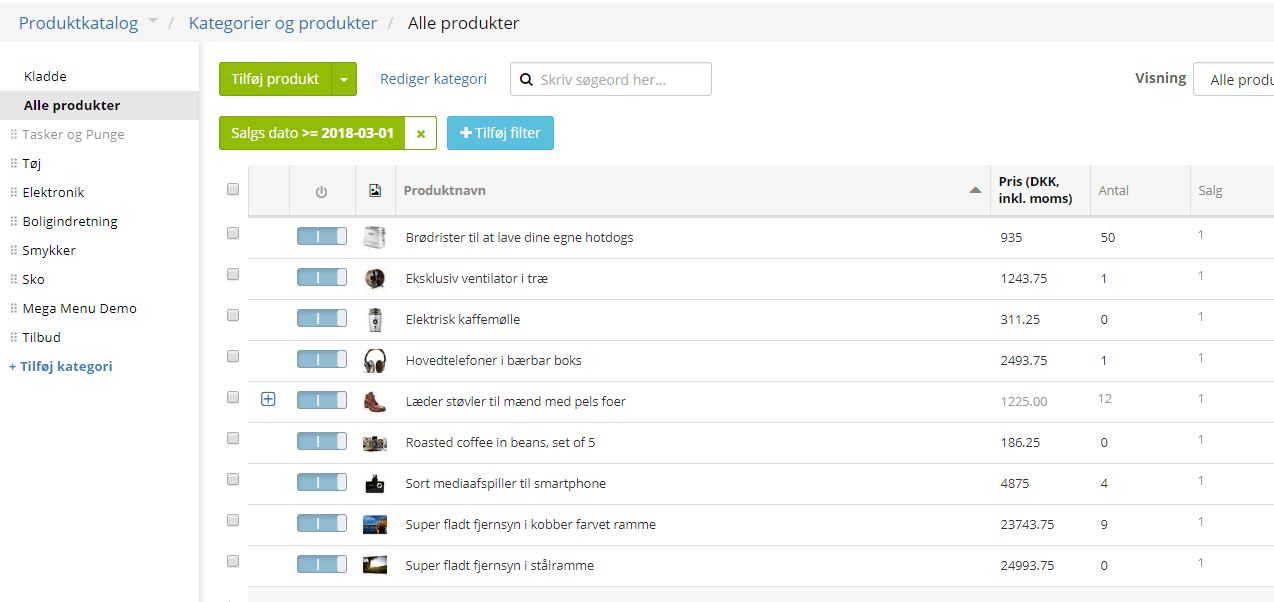
An extra column called Sales appears, where you can see the number of products sold in that period.
In the example below, greater than/equal to 1 March 2018 has been entered – so it shows all sales made from 1 March 2018 onwards.
If you only want, e.g., the sales from January 2018, you need to create 2 filters. One with greater than/equal to 1 January 2018 and one with less than/equal to 31 January 2018.
Payment with Klarna
It is now possible to use Klarna as a payment method.
Note: In BETA – please contact us if you would like to get started with Klarna.
Klarna is aimed especially at the Swedish market and works a bit like ViaBill – that is, “Buy now, pay later”.
Read more about payment with Klarna here
Stock synchronisation
It is now possible to synchronise stock between several shops.
If, for example, you have a shop in Denmark and a shop in Sweden where the products are taken from the same stock, you can now keep your stock synchronised between the two shops all the time.