
In this category Release notes
Update: version 6.30
On this page
There is another update ready with new features for your online shop.
Some “under the bonnet” and others more visible.
As for “under the bonnet”, it includes, among other things, yet another extension of the integration options. New integrations are also added all the time. One of these is an integration with the PosONE POS system.
So your stock in the online shop can now be updated automatically when you sell something in a physical shop.
The other new features we would like to highlight here:
- Your customers can create several wish lists
- Create new brands and suppliers directly from the product page
- Redirecting web addresses
- Choose the web address of information pages yourself
- Simplified first page of products in the admin
- Export orders with specific product(s)
- Pages with their own template
Create several wish lists
A long-wished-for option to create more than one wish list has finally arrived.
Your customers can now create as many wish lists as they like – one for each family member, one for Christmas presents, one for an anniversary or one for the dog.
See the guide to the new feature here.
Create new brands and suppliers directly from the product page
When you are creating a product, you can add both a supplier and brands. Previously, these had to be created separately first, on another page.
It is now possible, directly while creating the product, to add one or more new suppliers or new brands without interrupting the process.
That way you save time and move quickly on to the next product.
Read here about how to create brands
Read here about how to create suppliers
Redirecting pages/links (301 redirect)
Previously you had to go via PlanetController to redirect web addresses – now it can be done directly from the online shop’s admin.
You can (for now) still create and change redirects via PlanetController. The best thing, however, is to copy the current ones over and only create new ones in the online shop’s admin.
The new redirect automatically follows along if you change the web address of a product or category.
Read more about the new feature here
Choose the web address of information pages yourself
Do your information pages have long and awkward URLs? Then the solution has now arrived.
You can now get

to be shown as

Read more about information pages here – and the option to create a custom path.
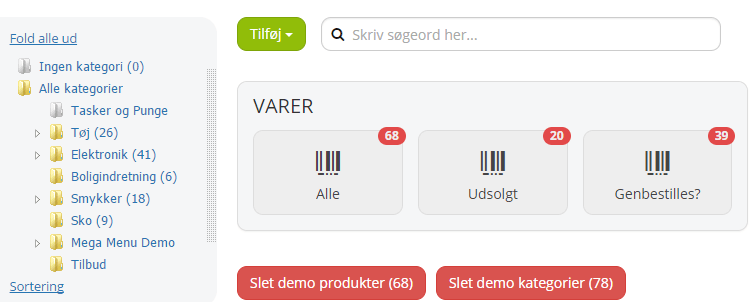
Simplified first page of the product catalogue
You rarely need the whole list of your products. That’s why we have simplified the start page of the product catalogue.
When you open the page, you now get these options:
- You can easily add a new product/category/product set
- You can search for a product or category
- You can choose to see All products
- You can choose to see all Sold out products
- You can choose to see all products that need reordering
- You can choose the category you want to see, on the left
Export orders with specific product(s)
If you need to reach all the customers who have bought a particular type of coffee machine because there is a fault with the product, you can now export a list of the orders that contain exactly that product ID or those product IDs.
For products with variants, it is the variant’s ID you need to enter.
For products without variants, it is the first ID that should be used. The ID is found on the General tab.
Pages with their own template
It is now possible to create information pages that each have their very own template.
What we’re working on
Right now we are working on these, among other things, which weren’t ready in time for this update:
- Integration with YourGLS (direct integration without using files for Interline)
- Major update of the design tool (easier, with new design options)
- Extended Mailchimp integration. Send targeted newsletters based on previous purchases.
- Creating orders via the API (for use by integrations)