In this category Release notes
What’s new in version 6.21
On this page
Among other things, this update brings a fantastic way of adding filters to your products, so your customers can see the products they want much more easily.
Giving your customers good filtering options can be crucial to them finding your shop especially easy to shop in.
The new features of this update in brief:
- Filtering products by “anything”
- New ways of doing the same thing to several orders at once
- The master password is back
- Find functions faster in the admin
Filtering products by “anything”
Imagine a customer looking for a new shirt.
The customer has decided it has to have a checked pattern.
He comes into the shop. Finds the product category with shirts.
Here you go – here are 157 different shirts – try finding the checked ones.
The customer thinks: I’ll have to look at that later. Later becomes never, or another shop.
Now you can make it much easier for your customers to find a selection of exactly the products they are interested in.
This is how it could look in the shirts example:
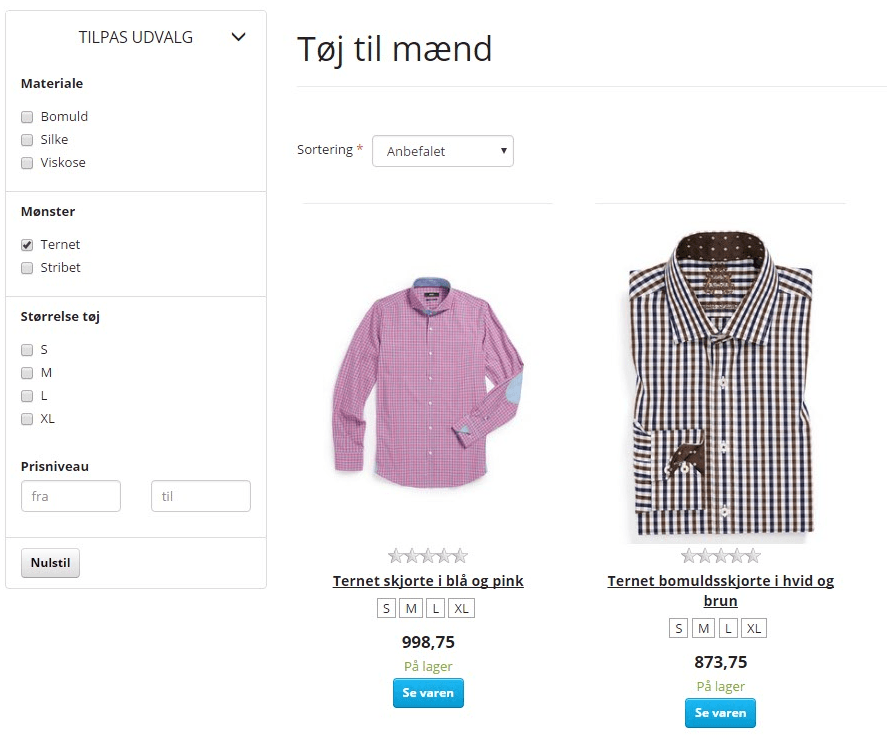
There are basically no limits to the filtering options you can create. Think like the customer, and add what helps.
In this first version of filtering by attributes there are 2 limitations:
- Max. 1 attribute from the same group on a product (e.g. one pattern)
- After a filter has been chosen, options that are no longer possible are still shown
Both these limitations will be removed in a coming update.
You’ll find a guide to setting up attributes here.
New ways of doing the same thing to several orders at once
Order processing can now be done even faster and more easily.
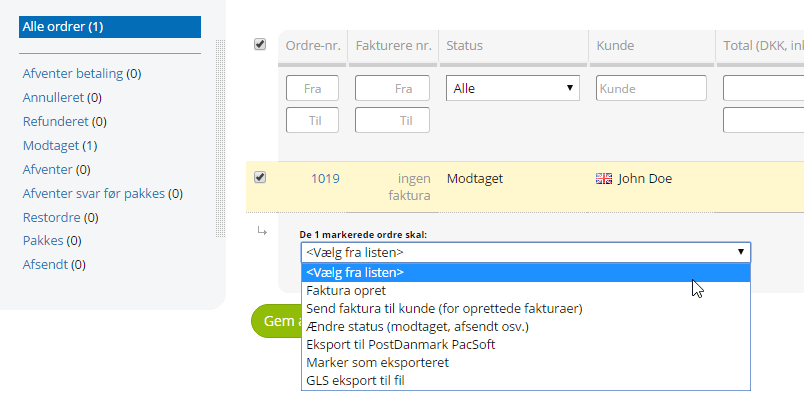
When you select one or more orders in the list, you can now also:
- Create an invoice
- Send the invoice to the customer
- Change the status (received, dispatched etc.)
You’ll find the new options by going to the order list, selecting the orders and then choosing what should happen to them:
The master password is back
With the master password, you can use one and the same password to log in to the shop as a customer with their email address.
After we made it possible to log in from the customer list and removed the master password, several people have missed it.
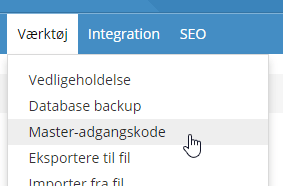
Now it is back, working with the new user management system. In the same place in the menu as before:
Find functions faster in the admin
Now you can find menu items directly via the search field: