In this category Release notes
Version 6.42
On this page
Over the summer we have been working on some updates for your online shop, which first and foremost contain this:
- Customers can get a link to approve a card payment (of the same or a higher amount)
- Delivery methods per category or product
- Minimum weight on delivery methods
- Send a credit note as a PDF by email to the customer
- Fee on Klarna payments
- Product slider per category or brand
- Categories can have a title different from the menu
Customers can get a link to approve a card payment

Now you can quickly and easily send the customer an email to approve a payment via QuickPay.
It can be useful, for example, when
- The customer didn’t complete the payment (e.g. if Nets’ systems don’t respond, or the customer couldn’t find their Dankort, the Danish debit card, right then)
- The order has been changed and has a higher total
- The customer chose a different payment option but has to pay by card after all
That way neither you nor the customer has to create the order from scratch.
You can read more about how it works at the bottom of this page about day-to-day card payments.
! NOTE: The order must have been placed after the upgrade – so older orders don’t have this option !
Delivery methods per category or product
Far from everything can be sent with any delivery method. DAO, for example, only takes relatively small items. The very large items may need to go by freight carrier. And other things, such as batteries and cleaning products, may need special handling.
You can solve that challenge by limiting the delivery methods to selected ones when particular products are in the basket.
This is done with so-called shipping classes, which can be set both per category and on individual products.
Read more about shipping classes in the guide here.
Minimum weight on delivery methods
Yet another option for optimising shipping. Free delivery on orders over €70, but no reason to send a “little gadget” in an expensive PostNord parcel?
On all shipping modules you can now set a minimum weight for a delivery method to be offered.

Send a credit note as a PDF by email to the customer
It has long been possible to send an invoice to the customer as a PDF with a single click.
Now it is also possible with a credit note.
When the credit note has been created, simply open it and click here at the top of the page:

Fee on Klarna payments
Are you tired of paying for the whole show with Klarna payments? If so, you can now go to the setup of the Klarna module and add a fee.
Product slider per category or brand
Perhaps you have just started selling a new type of product and would like to highlight them on the home page.
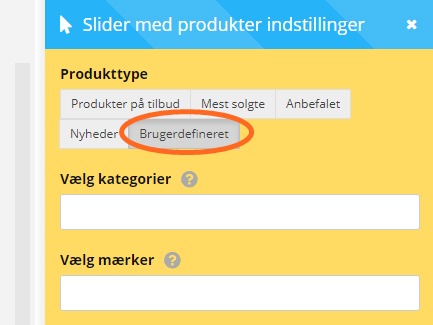
You can now do this by choosing the product type Custom at the far right of a slider in the layout tool.
There you have two new fields where you can choose categories and/or brands for the products to be shown in the slider.
Categories can have a title different from the menu
The heading of a page can be very useful for helping both customers and search engines understand better what the page is about.
Until now, the heading of categories has been the same as the page’s title in the menu.
If you have a menu called, e.g., “Red wine” with “Australia” below it, you can now create a heading called “Red wine from Australia” instead of just “Australia”.
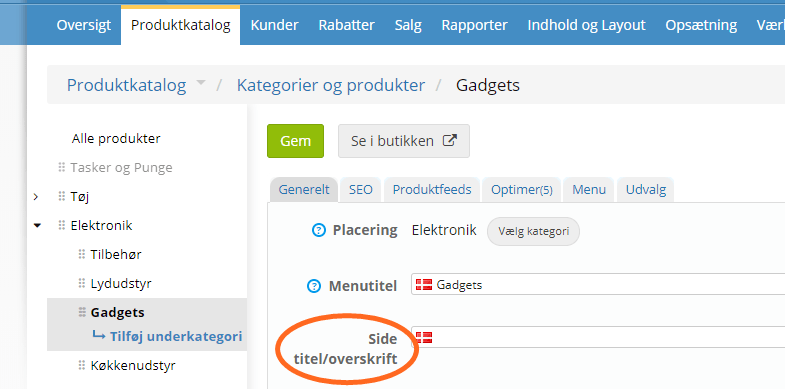
When a page needs a heading different from the menu title, you can write it when editing/adding the category, like here: