
In this category Release notes
Update: version 6.29
On this page
This update brings several new things. Both new features and changes that should make the daily work with your online shop even easier.
Besides lots of little things, you get this:
- Customise texts in emails to customers
- Text for products from customers
- Add several products to the basket with one button
- Mailchimp updates subscribers automatically
- Measure newsletter sign-ups
- Search for model/product number in orders
- Search for brand product number in the admin
- Find products with the same model/product number
- Create/edit variants – now with less scrolling
- Extension of the API
Customise texts in emails to customers
A long-wished-for option to change the texts in the automatic emails that go to customers has finally arrived.
Do you think “Dear customer” is a little too formal for your customers, or do you want to add or delete some text? Then you can now customise these emails:
- Order confirmation
- Registration of new user/login
- Welcome to new customer
- Back-in-stock notification
- Invoice PDF attached
You can customise these emails in the admin via Content and layout > Email standard texts.
See the guide to the new feature here.
Text for products from customers
Now your customers can write text for products before they are added to the basket in your shop.
This could be for selling, for example:
- T-shirts with prints
- Engraved signs
- Jewellery with a personal engraving
It could also be an option to write a general comment about a product.
The text field can be either required or optional.
See in this guide how to set it up.
Add several products to the basket with one button
Do you have customers who often buy many variants of a product on the same order? Then here is good news!
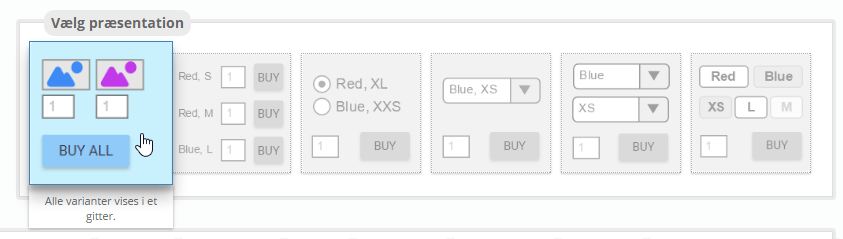
It is now possible to set things up so your customers can enter the quantity they want of each variant and then add them all to the basket with one click on the add-to-basket button.
If, for example, you sell yarn and customers often need different colours of a ball of yarn, this new option could be useful.
It could also be if you sell to business customers/wholesale (B2B), where your resellers buy several variants for their stock.
You can use this new feature simply by choosing it as the layout when setting up a product with variants:
Mailchimp updates subscribers automatically
Do you find it a hassle to click the Send subscribers button every time you send out newsletters via Mailchimp?
Then there is good news for you in this update!
From now on, newsletter subscribers are sent over to Mailchimp automatically. A subscriber is still only sent over after the email address has been checked as valid, which happens within 24 hours of signing up.
Measure newsletter sign-ups
How many sign-ups to your newsletter do you get via your ads on AdWords?
Perhaps you have campaigns that don’t create much in sales here and now, but bring sign-ups to your newsletter, and with them the chance of a sale later that way.
It is now possible to set up newsletter sign-ups as a goal in your Google Analytics – see how in the guide here (section 6).
Search for brand product number in the admin
The search engine in the admin has also been extended with search by brand product number.
Search for model/product number in orders
The search engine in the admin now includes model/product numbers from orders.
This gives you a full list of all orders that include a particular product (provided the product had that specific model/product number at the time the order came in).
Enter the model/product number in the search at the top right, limit it to Orders if you like, and you get the list of orders that include the product.
Find products with the same model/product number
When model/product numbers are used for integration or for updating products, in most cases it is important that a product number is only used once per product.
Now you can quickly see whether you have products that use the same model/product number.
You do this from the product list by choosing the view Model/product number is duplicated.
Create/edit variants – now with less scrolling
We are preparing a bigger improvement to creating and changing products with variants.
As part of this project, you will now see that the top of the Variants tab takes up less space on the screen:
This is not only to save you time spent scrolling down the page – it is also to increase the speed of editing products (both with and without variants).
Extension of the API
The API (used for integration and exchanging data to/from your online shop) continues to be extended with many new options. Everyone signed up for news about the API (including any external developers you may have) is, as always, kept informed as the API is extended.